The Recipe for Modern Content Creation (Now with Extra Bytes!)
In the world of food blogging, freshness isn’t just about ingredients — it’s about content too. What if you could automate your recipe blog to be as efficient as a well-oiled kitchen? That’s exactly what we’ve cooked up with ‘Los Platos de Sara.’ Join us as we dive into the technical ingredients that make this automated recipe blog pipeline a true chef-d’oeuvre of modern web development.
Ever thought about turning your food pics into a full-fledged recipe empire? Well, grab your apron and your favorite IDE, because we’re about to whip up a tech soufflé that’ll make your taste buds AND your CPU cores tingle!
The Ingredients (Tech Stack à la Mode)
- Frontend: Hugo (because static sites are the new black)
- AI Brain: OpenAI GPT-4 Turbo (smarter than your average kitchen appliance)
- Content Management: Notion (where ideas marinate)
- Data Extraction: Apify (the sous chef that never sleeps)
- Image Storage: AWS S3 (infinite pantry space!)
- Hosting: GitLab Pages (serving up hot content 24/7)
- Automation: Python scripts (slithering through your content pipeline)
The Secret Sauce: Two-Stage Automation (Double the Flavor, Double the Fun)
Stage 1: From Instagram to Notion (The Content Harvester)
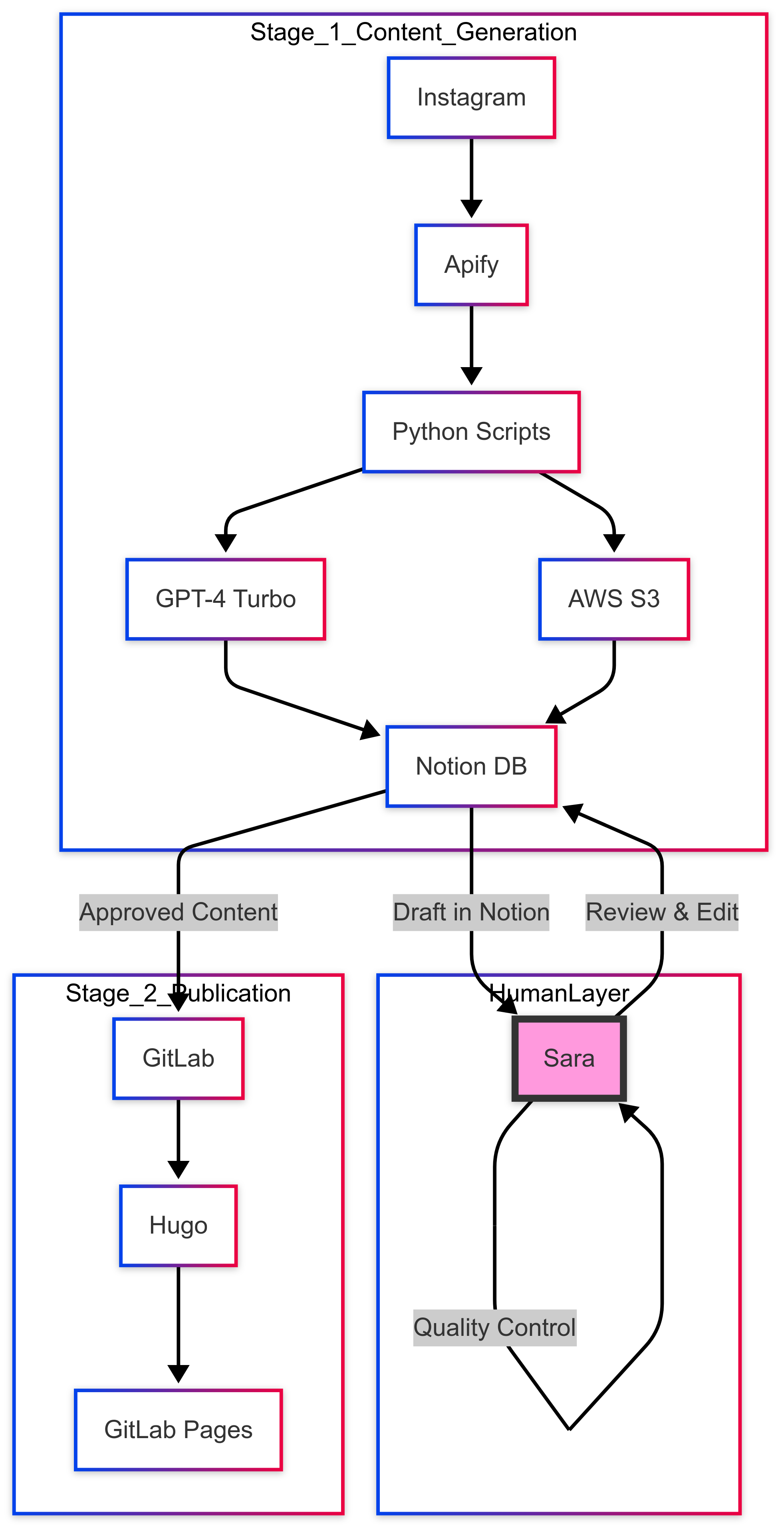
The first stage fetches Instagram posts, uses GPT-4 to transform captions into structured recipes, uploads images to S3, and stores everything in Notion for review and editing.
import apify
import openai
import boto3
from notion_client import Client

def instagram_to_notion():
    # Fetch those tasty Instagram morsels
    insta_posts = apify.run('instagram-scraper',
        {'username': 'los_platos_de_sara'})

    for post in insta_posts:
        # Let GPT-4 work its magic
        recipe_markdown = openai.ChatCompletion.create(
            model="gpt-4-turbo",
            messages=[{
                "role": "user",
                "content": f"Convert this to a recipe: {post['caption']}"
            }]
        )

        # Upload images to S3
        s3 = boto3.client('s3')
        image_url = s3.upload_file(
            post['image'],
            'my-recipe-bucket',
            f"{post['id']}.jpg"
        )

        # Serve it up to Notion
        notion = Client(auth=os.environ["NOTION_TOKEN"])
        notion.pages.create(
            parent={"database_id": os.environ["NOTION_DATABASE_ID"]},
            properties={
                "Title": {"title": [{"text": {"content": post['title']}}]},
                "Content": {"rich_text": [{"text": {"content": recipe_markdown}}]},
                "Image": {"files": [{"name": f"{post['id']}.jpg",
                          "external": {"url": image_url}}]}
            }
        )
Stage 2: From Notion to Production (The Content Sommelier)
Once recipes are reviewed and marked “Ready to Publish” in Notion, the second stage automatically deploys them to the Hugo site via GitLab.
from notion_client import Client
import gitlab
import frontmatter

def notion_to_gitlab():
    notion = Client(auth=os.environ["NOTION_TOKEN"])
    gl = gitlab.Gitlab(private_token=os.environ["GITLAB_TOKEN"])
    project = gl.projects.get(os.environ["GITLAB_PROJECT_ID"])

    # Fetch the crème de la crème from Notion
    recipes = notion.databases.query(
        database_id=os.environ["NOTION_DATABASE_ID"],
        filter={"property": "Status",
                "select": {"equals": "Ready to Publish"}}
    )

    for recipe in recipes.results:
        # Transform to Hugo-friendly Markdown
        hugo_content = frontmatter.dumps(
            frontmatter.loads(recipe.properties["Content"].rich_text[0].plain_text)
        )

        # Deploy to GitLab
        project.files.create({
            'file_path': f'content/recipes/{recipe.properties["Title"].title[0].plain_text}.md',
            'branch': 'main',
            'content': hugo_content,
            'commit_message': f'Add new recipe: {recipe.properties["Title"].title[0].plain_text}'
        })

        # Mark as published
        notion.pages.update(
            recipe.id,
            properties={"Status": {"select": {"name": "Published"}}}
        )
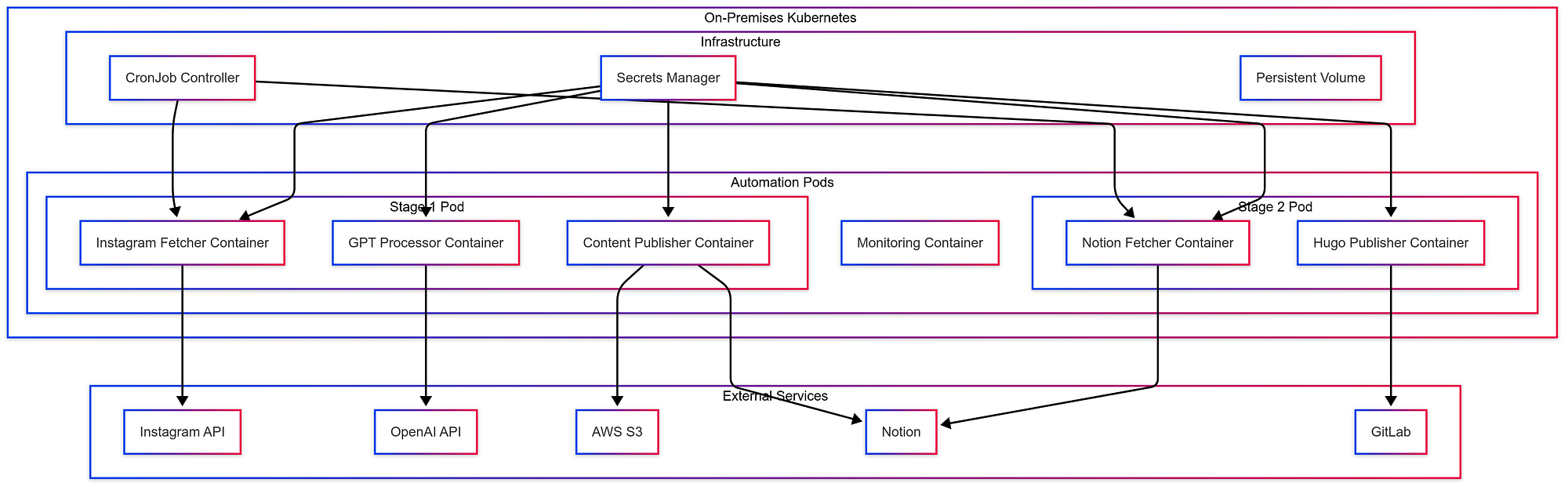
The Infrastructure Behind It
The Presentation Layer (Because We Eat with Our Eyes First)
Our Notion-powered frontend is dressed to impress:
- Responsive design (looks good on everything from smartphones to smart fridges)
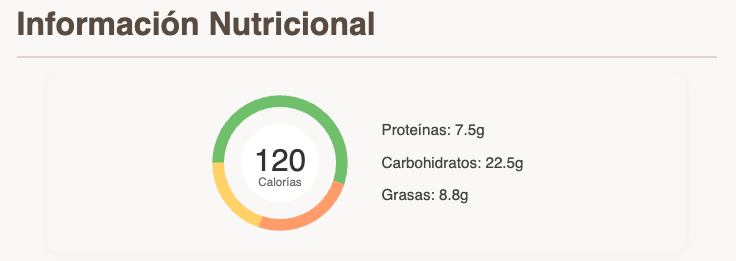
- Custom donut charts for nutritional info (because pie charts were too on-the-nose)
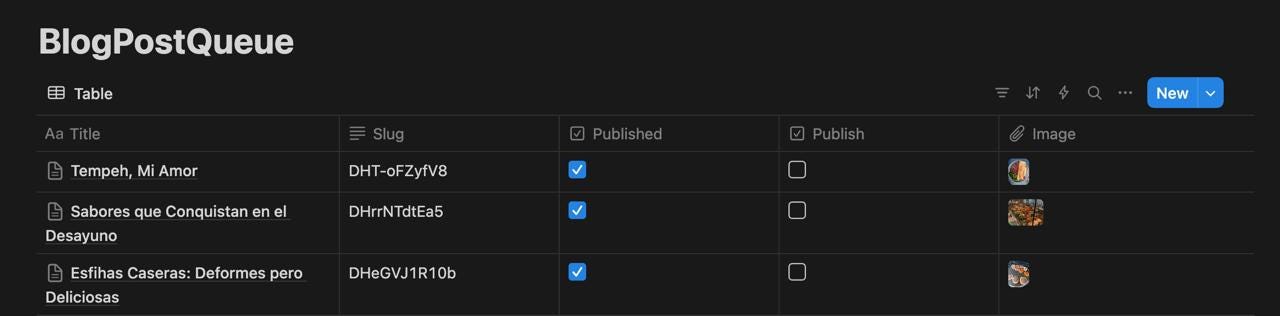
- High-quality images (food porn, but make it classy)
- Social media integration (spread the flavor!)
- SEO optimization using Schema.org (Google’s gotta eat too)
Why This Matters (or: How I Learned to Stop Worrying and Love the Bot)
This automation pipeline is the kitchen gadget you never knew you needed:
- No more copy-pasta from Instagram (unless it’s an actual pasta recipe)
- Consistent formatting (because messy recipes are for your kitchen, not your blog)
- Lightning fast publishing — From Insta-story to published glory faster than you can say “Bon Appétit!”
- AI-assisted processing (it’s like having Gordon Ramsay as your personal editor, minus the yelling)
- Scales faster than your waistline during the holidays
The Technical Benefits (Nerdy, but Nice)
- Separation of Concerns: Like keeping your peas from touching your mashed potatoes
- Scalability: It can handle more recipes than your grandmother’s cookbook
- Maintainability: Easier to update than your relationship status
- Reliability: More dependable than your sourdough starter
- Flexibility: Bends like a pizza maker tossing dough
A Feast for the Senses (and the Servers)
By marrying the power of social media, AI, and static site generation, we’ve created a content kitchen that’s always open. It’s a testament to how modern tools can turn even the most complex recipes into a piece of cake.
The full recipe (I mean, code) is available on GitLab, and you can taste the final product at the live site.
Now, if you’ll excuse me, all this coding has made me hungry. Time to Instagram my lunch and watch it magically appear on the blog!
Bon appétit and happy coding! 🍳💻🥘
Source code: gitlab.com/felipedbene/los-platos-de-sara
Originally published on Medium.